Price Components
A price component is one piece of a price. A rate plan price, an add-on price or a charge price holds one or more components, and each component has its own charge model, its own included quantity and its own limits. BillHive rates every component with the same engine, so estimates, orders, renewals, plan changes and invoices all give the same number.
When to use components
Use more than one component when a plan is sold as several pieces. For example, a SendGrid-style email plan is a flat monthly fee plus two metered pieces, each with an allowance and an overage rate:
| Piece | Type | Charge model | Included | Price |
|---|---|---|---|---|
| Base fee | Recurring | Flat | n/a | ₹15 per month |
| Emails | Usage | Per Unit | 15,000 | ₹0.004 per email after that |
| Contacts | Usage | Per Unit | 5,000 | ₹0.004 per contact after that |
Before components, a price could only hold one amount and one model, so a plan like this needed workarounds.
Component types
| Type | What it is | When it is billed | Page |
|---|---|---|---|
| Recurring | A fee for the period, either fixed or per seat | In advance by default, or in arrears | Billing Timing |
| Usage | Metered by the events you send | In arrears, always | Usage-Based Billing |
| One-time | A fee charged once, such as a setup fee | When its trigger happens | One-Time and Event Fees |
| Event | A fee for each time something happens, such as a port-out | On the next invoice, after you charge it | One-Time and Event Fees |
Build a plan in the rate plan builder
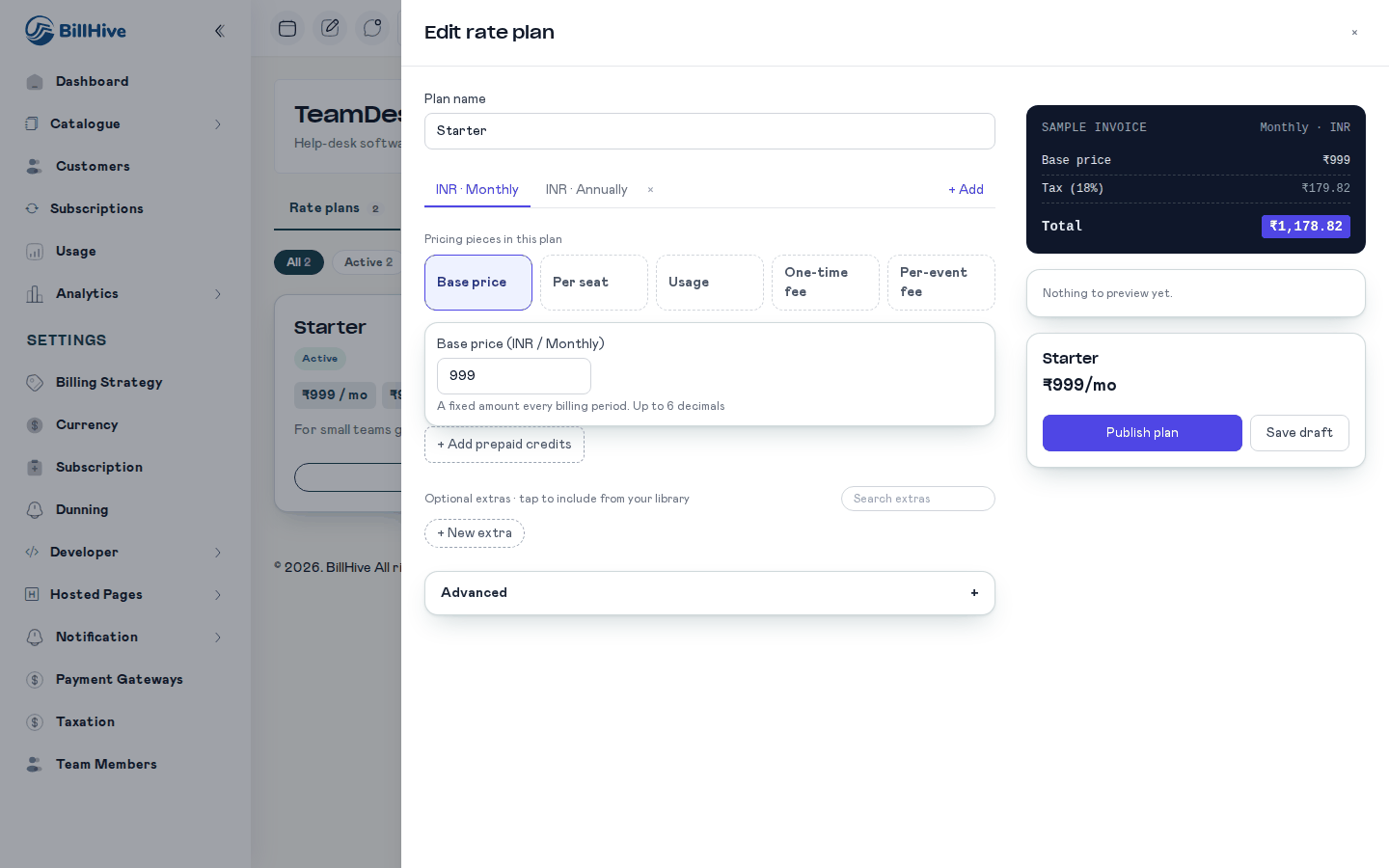
The rate plan builder. Pick pricing pieces on the left; the sample invoice on the right updates as you type.
Open the builder
On the product details page, click New rate plan. To change a plan that exists, use its edit action on the rate plan card. The builder opens as a panel on the right.
Pick a pricing style
For a new plan the panel first asks you to pick a style. The cards are Simple subscription (same price every month), Per seat (grows with team size), Base + usage (allowance, then pay for extra) and Start blank (build it piece by piece). A Prepaid credits card is shown as Coming soon. You add prepaid credits from inside the plan instead (see Prepaid Credits).
Name the plan
Type the Plan name.
Choose a currency and billing period
Each tab at the top is one price point, shown as the currency and the billing period, for example INR · Monthly. Click + Add to add another currency or period. The menu says Every period and currency is already added. once there is nothing left to add. Click the × next to the active tab to remove a price point (the last one cannot be removed).
Turn on the pricing pieces
Under Pricing pieces in this plan, click the tiles to switch pieces on or off:
| Tile | Adds |
|---|---|
| Base price | A flat recurring component. Field: Base price (currency and billing period shown in the label). |
| Per seat | A recurring per-seat component. Fields: Price per seat (or Price per pack of seats) and Seat unit label. |
| Usage | A metered component. Fields: Usage name, Unit label, Price per unit, Included units. |
| One-time fee | A one-time component. See One-Time and Event Fees. |
| Per-event fee | An event component. See One-Time and Event Fees. |
Amounts take up to 6 decimal places. A usage piece needs an event type, which you set under Advanced (see below).
Choose how seats and usage are priced
Seat and usage pieces have a How is it priced? choice: Per unit, Packs, Steps or Tiers. See Charge Models. Each also has + Add minimum or cap.
Set the usage meter under Advanced
Open Advanced and, for each usage piece, fill in event type and aggregation (SUM, COUNT, MIN, MAX or AVG). The event type must match the eventType you send with usage events. If it is empty the usage piece shows an error that points you here: set it under Advanced.
Check the preview
The right-hand side shows a Sample invoice. Sliders for seats and for each usage piece change the quantities, and the Total updates. The preview uses the same rules as the engine, so the number matches what the customer will be charged. Per-event fees are not in the preview, because they are charged as they happen.
Publish or save a draft
Click Publish plan to make the plan available, or Save draft to keep it unpublished. A progress list shows each save step. Entries that are not valid block saving.
A plan that was made through the API with a combination the builder cannot show opens read-only. The builder tells you what it cannot edit and links to the classic editor, or tells you to use the v2 API. It never reshapes the plan.
Settings of a component
These are the settings that apply to every component. The settings of each charge model are on Charge Models.
| Setting | API field | Allowed values | Default | Rules |
|---|---|---|---|---|
| Type | chargeType | RECURRING, USAGE, ONE_TIME, EVENT | none | Required. Error: Component N has an invalid chargeType. |
| Charge model | chargeModel | FLAT, PER_UNIT, VOLUME, GRADUATED, PERCENTAGE, STAIRSTEP, PACKAGE | none | Required. Error: Component N has an invalid chargeModel. |
| Name | name | Text | none | Shown on the invoice line. In the builder a one-time fee and a per-event fee must have a name (Enter a name). |
| Unit label | unitLabel | Text | none | Display only, for example seat or email. |
| Flat amount | flatAmount | Number | none | The price of a FLAT component. Also the per-occurrence price of a FLAT event. |
| Unit price | unitPrice | Number | none | The price of one unit (PER_UNIT), or of one pack (PACKAGE), or a percentage (PERCENTAGE). |
| Included quantity | includedQuantity | Number of 0 or more | 0 | Subtracted before the charge model. See Included quantity. Error for a non-number: Component N has an invalid includedQuantity. |
| Event type | eventType | Text | none | Usage only. Must match the eventType of your usage events. |
| Aggregation | aggregation | SUM, COUNT, MIN, MAX, AVG in the builder | SUM | Usage only. |
| Aggregation property | aggProperty | Text | none | The event property to aggregate. |
| Filters | filters | JSON | none | Narrows the events counted. |
| Billing timing | billingTiming | IN_ADVANCE, IN_ARREARS | By type | See Billing Timing. |
| Pass-through | passThrough | true or false | false | See Pass-Through Charges. |
| Paid from credits | drawsFromWallet | true or false | false (the builder turns it on for usage, event and pass-through pieces) | See Prepaid Credits. |
A price needs at least one component. Otherwise the API answers 422 with A price needs at least one component.
Flat
A flat component charges one fixed amount per billing period, whatever the quantity. Use it for a base fee or a platform fee.
| Setting | Value |
|---|---|
chargeModel | FLAT |
flatAmount | The amount per period |
| Minimum and cap | Not allowed. Error: Component N minAmount is not allowed on FLAT components |
Example. A base fee of ₹15 a month gives a ₹15 line each month. With GST at 18% the line carries ₹2.70 of GST, so the customer pays ₹17.70.
The design says an included quantity on a flat component should be rejected. The v2 API does not reject it. It has no effect on a flat component, so leave it empty.
Per unit
A per-unit component multiplies a price by the quantity. For a recurring component the quantity is the seats the customer bought. For a usage component it is the usage of the period.
The amount is (quantity − included quantity) × unit price, never below zero.
| Setting | Value |
|---|---|
chargeModel | PER_UNIT |
unitPrice | The price of one unit |
includedQuantity | Units at no charge |
Example, emails. Emails are ₹0.004 each after 15,000 included. In a month with 18,000 emails, 3,000 are billable, so the line is 3,000 × ₹0.004 = ₹12.
Example, seats. A per-seat price of ₹100 with 3 seats is ₹300 a month. With one seat included in the price, 2 billable seats are ₹200.
Included quantity
The included quantity is the part of the usage or the seats that costs nothing.
- It is taken off before the charge model and before tiers. Tiers apply to the billable quantity,
max(0, quantity − included). - It is allowed on per-unit, volume, graduated, stairstep, package and usage components.
- For usage, the allowance resets every billing period.
- For a recurring per-unit component it reduces the billable seats. In the classic form this is the Free Quantity field.
- On a plan change in the middle of a period, the allowances are prorated by the days on each plan.
Example, Contacts. A contacts piece has 5,000 included at ₹0.004 per contact. In a month with a peak of 7,000 contacts (aggregation MAX), 2,000 are billable, so the line is 2,000 × ₹0.004 = ₹8.
Precision and rounding
- Unit prices, tier prices and the rating maths use 6 decimal places.
- Each invoice line’s amount and its GST (taxable value, CGST, SGST, IGST) are rounded to the currency’s smallest unit, which is paise for rupees.
- The invoice total is the sum of the rounded lines. The total is never rounded again, so the invoice is always GST-compliant.
Proration
A recurring component is prorated by days when a period is shorter than a full one: a first period that starts in the middle of a cycle, or a period cut short by a plan change or a cancellation. Usage and event components are never prorated. Minimum and cap amounts are not prorated either (see Charge Models).
MRR
In-arrears recurring components count towards MRR like in-advance ones. One-time fees, event fees, pending charges and pass-through amounts do not count, because they are not recurring revenue. Usage stays as it was.
How a component appears on the invoice
Each component becomes one line on the order and the invoice. A graduated component shows its tier bands in the line details. A usage line has a label that says why the amount is what it is. See Charge Models for the labels.
At purchase, a usage component is shown as Billed on usage with a zero amount, and its rate is shown beside it.
Limits
- The classic form and the v1 API cannot change a price with several components, or with any setting the classic form does not know. See v1 is read-only for these settings.
- Linked add-ons and charges stay separate priced items. A one-time fee component is an extra, simpler way to add a fee, and linked charges keep working as before.
- All components of a price share the price’s billing period. A component cannot have its own billing period.
- Usage minimum and cap are shared across price points, like the usage unit price.